
Search
OSDP contains a large and diverse amount of content spanning Datasets, Publications, Monitoring Stations, Development Activities, and Content Collections. To enable discovery of the content you seek, several mechanisms exist to search and Filter the OSDP records. Each of these records contain Metadata Fields (information about the source content) that further describe the content being provided by and housed in the Contributor Systems.
The following provides an overview of the major sections of the search page, organized from top to bottom. A sample image follows the text describing each section.
- Search and Map tabs: The Search page’s Search Tab is used to find and filter OSDP records. Once discovered, most of these records can be represented in a map viewer on the Map tab, by using the Add to Map or Map Area functions.

- Search Control Block: The section under the tabs provides the options to control the current search, and to create and manage a library of your curated Saved Search Requests.

- Help: Access to this help page is accessible via the Help link.
- Keyword Search: One or more keywords and/or “quoted phrases” can be combined with a search condition to compare to the OSDP record contents, by providing the details and then clicking the Search button or pressing the Enter key. Multiple keyword search criteria can be prepared and each will be available for one-click modification or deletion in the Active Filters block, described below.
- Saved Search: The current keyword search criteria and filters can be further augmented with a named Saved Search Request that you previously created, by selecting it from the drop-down menu. Further, you can create a new Saved Search Request from the current search filters by clicking the Save New button, or manage/augment requests in your library by clicking the Manage button.
- Pre-populated searches: Note that other services within the OSDP site may offer to optionally populate your search criteria for you, to find a specific subset of records. These requests will initiate a new search, replacing the old. For example, quick searches can be initiated via a Map Search (Search by selected area) or Retrieve Mapped Records from the Map tab, via curated views prepared on the Learn About Cumulative Effects and Learn About Development Activities pages, or via special Call to Actions that specific curated collections may hold.
- Filters: The Filters block provides access to the most common Metadata Field filters spanning Location, Time, Source, Record, and attached Resources. These filters are applied in conjunction with the keyword filters, and any selected Saved Search Request. Select one of the filter groups to be presented with pop-up filter options. The Show Active Filters checkbox denotes whether you’d like to hide or show the Active Filters block, described below.

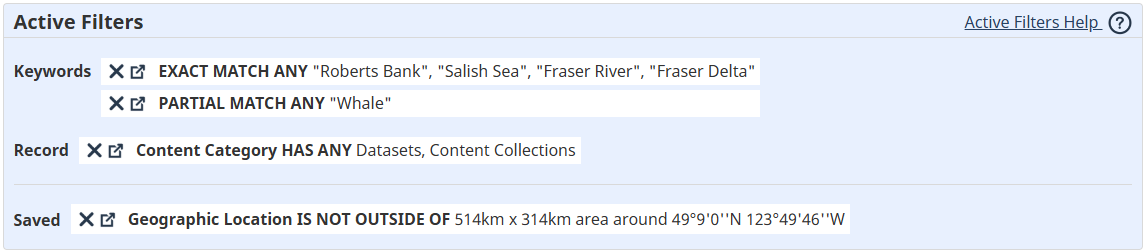
- Active Filters: The Active Filters block provides a view of which filters have been applied to the Search Result Set, and a quick means to either remove them (click on the X) or modify them (click on the link icon or the filter itself).
- Search Result Set: Contains the list of records that result from a combination of the search criteria that have been applied, as described in the Active Filters block. It provides access to Tabs to narrow the current view by Content Category, list-level sharing and export Tools, a list Management Bar, individual Search Result Set Item details, and access to each record’s Metadata Page. Note that the checkboxes on the tabs provide a shortcut to set the Content Category filter, including or excluding entire categories of content in 1 click.

- Metadata Page: Every record listed in the Search Result Set has additional details that can be discovered by clicking on its Title link. The resulting Metadata Page provides a summary of all Metadata Field information captured for a specific record, and access to related tools.